Product
Everything your sales team needs to run wholesale.
Atlo replaces spreadsheets, CRM workarounds and manual follow-ups with one order-based system built for lifestyle brands selling wholesale. Instead of dashboards, your team gets clear actions it can execute every day.
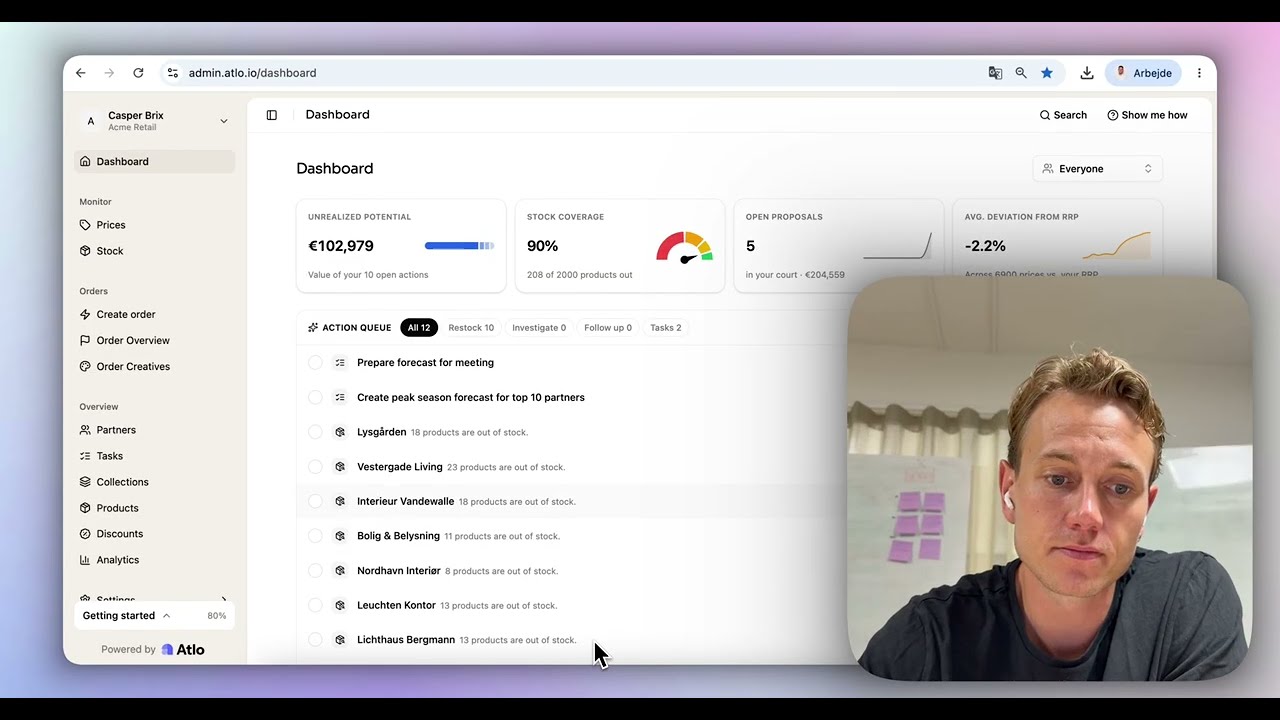
Step by step
From daily scan to drafted order.
Example brand · 48 partners
Every morning, Atlo checks your products at every retail partner, from 20 to 1,000+.
How it works
From webshop data to a placed order. Every week, for every partner.
Atlo reads your products on each partner's public webshop: stock status, price and listing. No integrations on your side or theirs. You decide what to send.
Stock monitoring
Every retailer's stock, every morning.
See what each partner has in stock, what is missing and which products are not listed at all. Alerts land the day a partner runs out.
Aava Interior
Finland · scanned 06:12
Price transparency
The price at every retailer, as they publish it.
See the published price per retailer and per product, next to your own RRP. Use it to set your own wholesale and webshop prices, time your campaigns and choose the partners that fit your brand. Retailers set their own resale prices.
Halo mirror · brass
RRP €219
Order suggestions
The order and the email, written for you.
Atlo turns your order flow into partner-specific order suggestions, sized to each partner’s stock and benchmarked against its peers. Each comes as an Excel file with a short message to the buyer. You review it and send it from your own inbox. The buyer orders the way they always do, and never deals with Atlo.
To buyer@nordhemliving.se
Subject Reorder for spring: 3 products
Hi Sara, three of our products are low or sold out on your webshop. Here is a suggested reorder:
Partner activation
Know which partners actually launched it.
Sending assets does not mean a product is live. Atlo checks which retail partners have listed your launches and novelties on their webshop, and which have not, so you follow up with the right ones.
Launch · Alva pendant, new colour
Assets sent 14 days ago
Action lists
A short list for each rep, every morning.
Instead of dashboards, your sales team gets clear, prioritized actions: where stock is running low, where reorders are overdue and where revenue is being left on the table.
Today · your actions
3 of 7 · sorted by revenue at stake
Reports and live data
Daily or weekly in your inbox. Live in Atlo any time.
Where you are losing sales, which retailers need an order, and which prices moved. Sent to you and your sales team as often as you want, and always up to date in Atlo.
Monday report · week 44
€18,240 in sales at risk
37
Out of stock
12
Price changes
6
Orders ready
- What we read
- Stock status, stock count where shown, price, discount and whether the product is listed. From public product pages only.
- How often
- Every product at every retailer, once a day in the early morning. Alerts the same day.
- What we compare against
- Yesterday's scan, your RRP list and your order history per retailer.
No integrations
Nothing to connect. Not your ERP, CRM or DAM.
Atlo reads your products on your partners' public webshops. All it needs is your product list and the names of your partners. No IT project, nothing for retailers to install. Live in 1 hour.
Not needed
- ERP Business Central, SAP, NetSuite
- CRM HubSpot, Salesforce, Pipedrive
- DAM / PIM Images and product data
- B2B portal Your wholesale webshop
- EDI Order integrations
 Live in 1 hour
All Atlo uses
- Your product list Excel or CSV with SKU or EAN
- Your partner names The retailers you sell through
- Retailer webshops Public product pages, read daily. Shopify, Magento, WooCommerce, Shopware or custom
Getting started
Live in one hour. Two steps for you, two for us.
- 1
Your step
Send your product list
SKUs or EANs, plus the names of your retail partners. A spreadsheet is fine.
- 2
Done by Atlo
We map your retailers
We find your products on every partner webshop. Live within 1 hour.
- 3
Done by Atlo
The report lands
Daily or weekly in your inbox, and live in Atlo any time.
- 4
Your step
You send the orders
Review the drafted proposals and send them from your inbox. Buyers order as usual.